Hybrid Content Management: How AI and Human Oversight Guarantee 99%+ Accuracy

The Blind Spot of Pure Automation in Data Entry
Automation in data entry sounds like a solved problem: connect an RPA script to your document flow, let the system extract fields, and data streams straight into your TMS or WMS. For standardized input — think fixed templates from a single shipper — that model works. But supply chain environments rarely produce uniform documents. To process these flows efficiently, professional web research and content management is crucial for data quality. Customs paperwork from Turkey looks nothing like paperwork from Singapore. A Bill of Lading from carrier A differs in layout from carrier B. Then there are handwritten corrections, stamps overlapping text, and scanned documents with inconsistent resolution.
This is where the weakness of purely algorithmic processing comes to light. AI models for document recognition are trained on patterns. When a document falls outside the expected pattern — an unusual table layout, an unconventional field name, or a mix of languages on a single form — extraction reliability drops. The algorithm “guesses,” often without indicating how uncertain that guess actually is. The result: product specifications are captured incorrectly, weights get swapped, or HS codes are matched to the wrong items.
The consequences extend far beyond a single erroneous data field. An incorrect HS code can lead to wrong import duties, customs delays, or fines. A swapped weight can disrupt transport planning. And every after-the-fact correction costs more time and money than the initial savings from automation delivered — a pattern explored in more detail below.
Lack of Context with Unstructured Source Data
Algorithms excel with structured data: fixed fields in fixed positions. A CSV file, an XML feed, a digital form with predefined input fields — that’s where RPA scores highest. But logistics documentation is often the opposite of structured.
Take a Commercial Invoice drawn up by an exporter in an arbitrary Excel template. The product description sits in column C for one party and column F for another. Or consider a Certificate of Origin where relevant fields have been merged into a single text block with no clear separation. Customs documents from different countries follow divergent standards, with variable formatting, different languages, and sometimes handwritten additions.
An algorithm lacks the domain knowledge to understand that “pcs” on an Asian document means the same as “pieces” on a European form, or that a crossed-out number with a handwritten correction above it represents the current value. Human readers interpret that context intuitively; a script sees only pixels and patterns. In practice, human involvement remains indispensable in machine learning to correctly process nuances like these.
This leads to a specific problem: silent errors. The system extracts a value with apparent certainty, while the underlying data has been misinterpreted. Without a human control layer, that error flows undetected into the operational system.
False Savings: Remediation Costs vs. Zero-Touch Ambitions
The business case for full automation is typically built on a simple equation: fewer manual hours = lower operational costs. That equation holds — as long as the error rate stays low. But with unstructured document flows, that rate climbs, and the cost picture shifts dramatically.
After-the-fact corrections are more expensive than initial processing. That’s due to a chain of steps:
- Detection — Someone has to notice the error first, often only when a downstream process breaks down (a customs declaration gets rejected, an invoice doesn’t match).
- Diagnosis — The source file must be retrieved and compared against the entered data to identify the root cause.
- Correction — The correct value must be determined and updated in the system.
- Downstream remediation — Dependent processes (declarations, invoices, transport orders) must be checked and potentially revised.
Each step consumes time from employees who should be doing other work. For organizations processing hundreds of documents daily, those correction moments add up. The projected savings of a zero-touch approach evaporate when remediation costs consistently exceed the investment in an upfront control layer.
How the Human-in-the-Loop Model Works
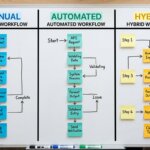
The hybrid model combines the processing speed of RPA with the judgment of trained specialists. The principle: let machines do what they’re good at (bulk, speed, repetition) and let people do what they’re good at (context, interpretation, exceptions). The dividing line between the two is determined by confidence scores — the degree to which the algorithm trusts the accuracy of an extracted value.
The process runs in three phases:
- Automated extraction — RPA scripts and OCR engines process incoming documents and extract data from recognizable fields.
- Classification based on confidence — Each extracted value receives a score indicating how certain the system is of its accuracy. Values above the threshold pass directly into the operational system. Values below the threshold are flagged as exceptions.
- Human validation — Flagged exceptions are routed to domain experts who review the data at line level, correct where needed, and approve for release.
This model avoids both extremes: the slow, expensive fully manual approach and the error-prone fully automated approach.
Separating Bulk Extraction from Exceptions
RPA’s strength lies in volume. For documents with a fixed structure — standard EDI messages, structured XML feeds, or recurring templates from established trading partners — the script reliably extracts the right values from the right fields. That can mean hundreds or thousands of documents per day, processed in a fraction of the time manual entry would require.
The system does more than just extract: it immediately isolates the anomalies. As soon as a document doesn’t fit the expected pattern — a missing field, an illegible character, a value outside a logical range — that document or specific data line is set aside. This separation happens in real time, during extraction itself. The result is two streams: a bulk stream of validated data that flows through immediately, and an exception stream that requires human attention.
The exception stream is typically a minority of the total volume, but it contains precisely the complex cases where the most errors would occur under fully automated processing.
Line-Level Validation by Domain Experts
Exceptions don’t land with just any employee. Line-level validation requires domain knowledge: someone who knows what a Bill of Lading looks like, what the standard HS codes are for a product category, and which abbreviations are common on a specific trade route.
In a hybrid model, these exceptions are handled by back-office specialists trained in the document types of the relevant sector. They work in a secure environment that complies with European privacy legislation, and they see both the original source document and the system-extracted value. This allows them to assess each line to determine whether the extraction is correct and, if not, enter the right value.
This is fundamentally different from a spot-check after the fact. With line-level validation, every flagged exception is reviewed before the data enters the operational system. Errors are intercepted before they cause damage — not after.
Checklist: Setting Confidence Score Thresholds
The confidence score threshold is the pivot point of the hybrid model. Set it too high, and nearly everything goes to human validation — eliminating the efficiency gains of automation. Set it too low, and too many borderline cases pass through unchecked.
The right threshold isn’t a universal number. It depends on several variables:
- Document type and uniformity — How standardized are the incoming documents? With high uniformity, the threshold can be set lower; with significant variation, a higher threshold is advisable.
- Consequences of an error — What’s the impact if an incorrect value reaches the system? For compliance-sensitive data (customs, financial), the threshold logically sits higher than for internally used reference data.
- Volume and capacity — How many exceptions can the validation team handle without building up backlogs? The threshold must be balanced against available human capacity.
- Historical error patterns — Analysis of previous extractions reveals which document types and fields fail most frequently. This information drives threshold configuration per field type.
- Feedback loop — Corrected exceptions must be fed back into the algorithm so that extraction quality improves and the threshold can be adjusted over time.
An effective implementation starts with a conservative (higher) threshold and lowers it gradually based on measurable algorithm performance.
Decision Framework: Manual vs. Automated vs. Hybrid
The choice between processing models isn’t an ideological debate — it’s an operational decision. Each model has a specific use case where it performs optimally, and a boundary where it fails.
The Limitations of Single-Mode Processing
Fully manual processing delivers high accuracy, provided the staff are experienced and have sufficient time. But the model doesn’t scale. As document volumes grow, you need to add people linearly. Double the volume means double the cost — with no productivity gain. During seasonal peaks or sudden growth, backlogs emerge that slow down the entire operation.
Fully automated RPA processing scales effortlessly: processing more documents requires barely any additional resources. But the model only works with strictly defined, standardized input. As document variation increases, so does the error rate. And as outlined earlier, after-the-fact corrections are more costly than preventive oversight.
The hybrid approach combines RPA’s scalability with the accuracy of human oversight. The machine handles the volume; people safeguard quality on the exceptions. The result is a model that grows with volume without a proportional increase in the error margin.
Comparison Table: Cost, Speed, Error Margin
| Criterion | Manual | Fully Automated (RPA) | Hybrid (RPA + Human-in-the-Loop) |
|---|---|---|---|
| Scalability | Low — linear cost increase with higher volume | High — minimal additional cost per document | High — bulk automated, exceptions handled by humans |
| Accuracy with uniform data | High (depends on staff experience) | High | High |
| Accuracy with unstructured data | High (but slow) | Low to moderate — rising error rate | High — exceptions are validated by humans |
| Turnaround time | Long | Short | Short for bulk, longer for exceptions |
| Remediation cost per error | Low (errors are usually caught immediately) | High (errors are often discovered late) | Low (errors are intercepted before system entry) |
| Suitability for compliance-sensitive data | Yes, but expensive | Risky without a control layer | Yes — human validation at critical points |
| Setup and maintenance | Minimal technical investment | High initial investment in scripting and templates | Moderate investment in technology + training |
This table is a simplification. Actual costs and performance depend on document volume, document variation, sector-specific requirements, and the quality of the implemented RPA scripts. But the pattern is consistent: for mixed document flows, the hybrid model delivers the best combination of cost, speed, and accuracy.
When Hybrid Content Management Is Unnecessary
Not every organization needs a hybrid model. Being honest about those boundaries is more useful than applying the same solution everywhere.
With fully uniform datasets and no exceptions. When an organization exclusively processes documents that follow a single fixed template — for example, standardized EDI messages from a limited number of established partners — standalone RPA performs perfectly well. There are no exceptions to validate manually, so the control layer adds no value. The investment in a hybrid setup is overhead with no return.
With low volumes and infrequent validation needs. A company processing ten documents per day doesn’t need automated bulk processing. The volume doesn’t justify the technical investment. Manual processing by an internal employee is more efficient and more cost-effective.
When there’s no time pressure. If there’s no operational urgency — no pending customs declaration, no invoice deadline, no downstream process waiting on the data — an internal employee can complete the processing at their own pace. The speed advantage of automation isn’t a decisive factor in that scenario.
When compliance requirements are absent. If the data isn’t subject to strict accuracy requirements from regulations or contractual obligations, the risk of a higher error rate carries less weight. The cost of a hybrid model is then disproportionate to the risk.
In all of these scenarios, the same principle applies: the hybrid model is designed for complexity and volume. Without those two factors, a simpler approach is the better choice.
Conclusion
Hybrid content management solves a concrete problem: the gap between the speed of automated extraction and the accuracy that unstructured document flows demand. By letting RPA handle the bulk and domain experts validate the exceptions, the error margin stays low while the model scales with volume. The prerequisite is that the organization deals with document variation, compliance requirements, and sufficient volume to justify the investment.
Organizations looking to benchmark their data entry processes against this model can request an analysis of their current document flow and processing chain for a high-quality execution of web research and content management. The EU-based Operations Centers (Romania) combine RPA technology with trained back-office teams operating under European privacy legislation — a setup suited to organizations for which data quality and GDPR compliance are non-negotiable requirements.